
Scanji is live on the Apple app store
Scanji turns Japanese text around you into something you can read and remember: photograph a sign, menu, or wrapper, tap any word for furigana and meaning, then study it later.
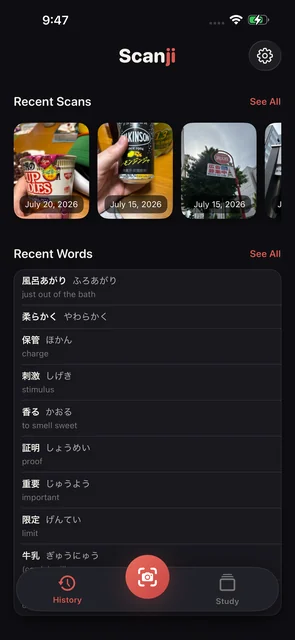
Scanji is for the Japanese that appears when you are not sitting at a desk.
A sign on the walk home. A menu you are almost brave enough to order from. The back of a snack wrapper. A page of vertical text that looks beautiful right up until you realize you cannot read enough of it yet.
Take a photo, tap a word, and Scanji gives you the reading and meaning right there on the image. If it is a word you want to keep, save it. The photo stays attached, so the word comes back with the place you found it.
Built around things you actually saw
Most study apps begin with somebody else's list. Scanji begins with your day. The words you meet in the world become the words you review later, which makes studying feel less like homework and more like paying attention.
- Photo scanning. Point Scanji at Japanese text and tap through the words it finds.
- Furigana and dictionary meanings. Get the reading without having to type a kanji you do not know yet.
- Vertical text support. Manga, novels, signs, and packaging can run top-to-bottom. Scanji handles those columns too.
- Offline lookup. The dictionary lives on your iPhone, built from JMdict and KANJIDIC2, so reading still works without a connection.
From reading to remembering
The free version gives you the reading half: scan, tap, look up, save, and return to your history. Scanji Pro adds the study loop for making those words stick.
Saved words can become flashcards with the original photo behind them. You can run quick multiple-choice quizzes, use an Anki-style review mode, drill JLPT decks from N5 through N1, and export your words when you want to study somewhere else.
There are small practical touches too: quiet capture for libraries and trains, optical zoom for tiny print, favorites, scan history, word history, and two hand-crafted themes for long reading sessions.
Private by default
Scanning, dictionary lookup, and study all happen on the device. There is no account to make, no cloud library to manage, and no server required before you can read the thing in front of you.
That matters because Scanji is meant for ordinary moments. Open it, read what is there, keep the words that matter, and get back to the world around you.
Get Scanji
Scanji is available now on the App Store for iPhone.
Download Scanji on the App Store
If you try it and something feels rough, tell us. It is built by a learner, for learners, and we read the messages.